

- 23.01.2023
two category post
rtyuhijo
On the main page of the official website of Yerevan Municipality, there is a "Construction Permits" window, after clicking on which a new window opens

(Photo 1) Already on the left side of the page with the Yerevan city map, in the "Administrative regions" window, select the region, the type of construction (if you know the exact address and the name of the developer, also them), and at the bottom, select "planning permit" or "building permit", after which an image of the construction is marked on the map (Figure 2).
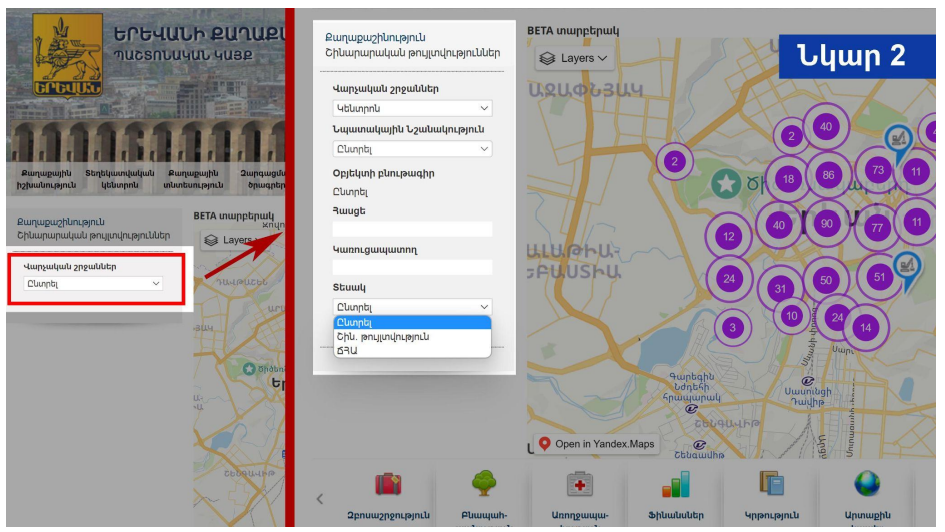
After clicking the mouse once on that image, a window will open, where the following information about the construction of a specific address will be available: administrative district, address, developer, purpose of the object under construction, characteristics, permit number, date of issue, date of completion (Figure 3).
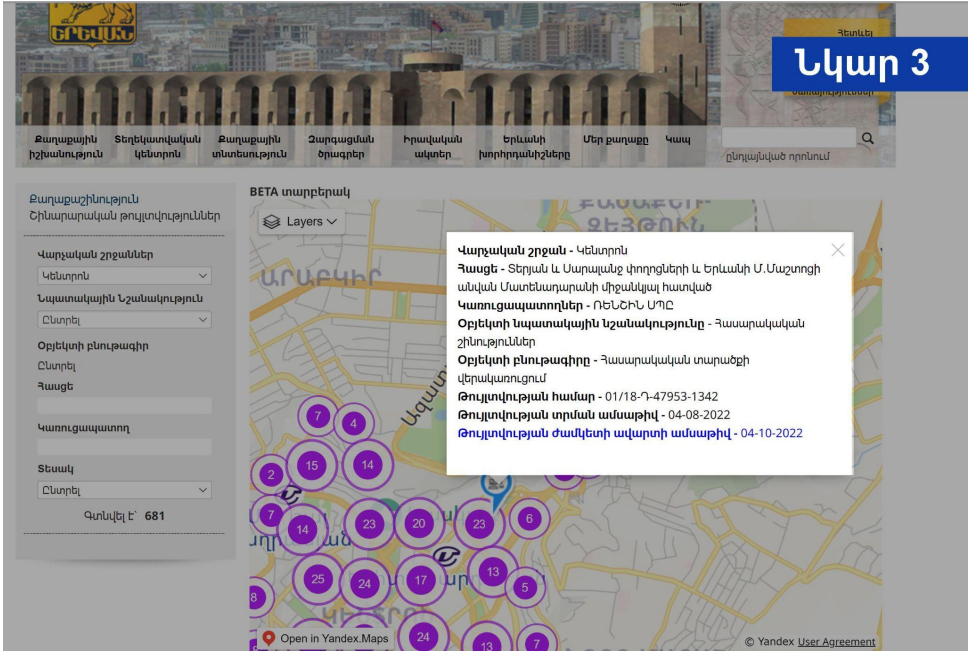


The construction permit is a document confirming the developer's right to carry out certain construc…
The electoral alliance was created by Stepan Demirchyan, leader of the People's Party of Armenia in …
Justice, in its broadest sense, is the principle that people get what they deserve, interpreting wha…